Launch monitor app · for data nerds

Every number behind every shot.

Telemetry Golf turns your launch monitor into a lab. Watch each shot fly, bounce and roll on a 3D range while two dozen numbers land beside it, then let the analytics tell you, with statistical confidence, exactly why that one went into the trees. Your swing may not be perfect. Your data will be gorgeous.

Open the app See what it finds Runs in your browser, nothing to install. Your first visit opens a real 146-shot practice session to poke at, no launch monitor needed.
A real practice session: a shot's flight and numbers, the analytics, the gapping chart, then 7-iron against 8-iron.

100% FREE to play. No login needed.

20+numbers per shot
5ways to find what's going wrong
8challenges and games
99problems, but your irons ain't one

What the data finds

One practice session, four plot twists

These are real numbers from one 146-shot session: the same demo you get on your first visit. Every finding below took the app zero seconds and a human golfer about six years to suspect.

PLOT TWIST 01 · GAPPING

Three clubs, one distance

5-iron carry168 yd
6-iron carry166 yd
7-iron carry164 yd

Three clubs in the bag, four yards apart. Two of them are passengers. The gapping chart flags the 1 and 2 yd gaps in red, because a gap that small means you're carrying a club for decoration.

Work on: strike and launch with the long irons first (the 5-iron should launch higher, not just faster). If they still bunch up, a hybrid will do the 5-iron's job better.
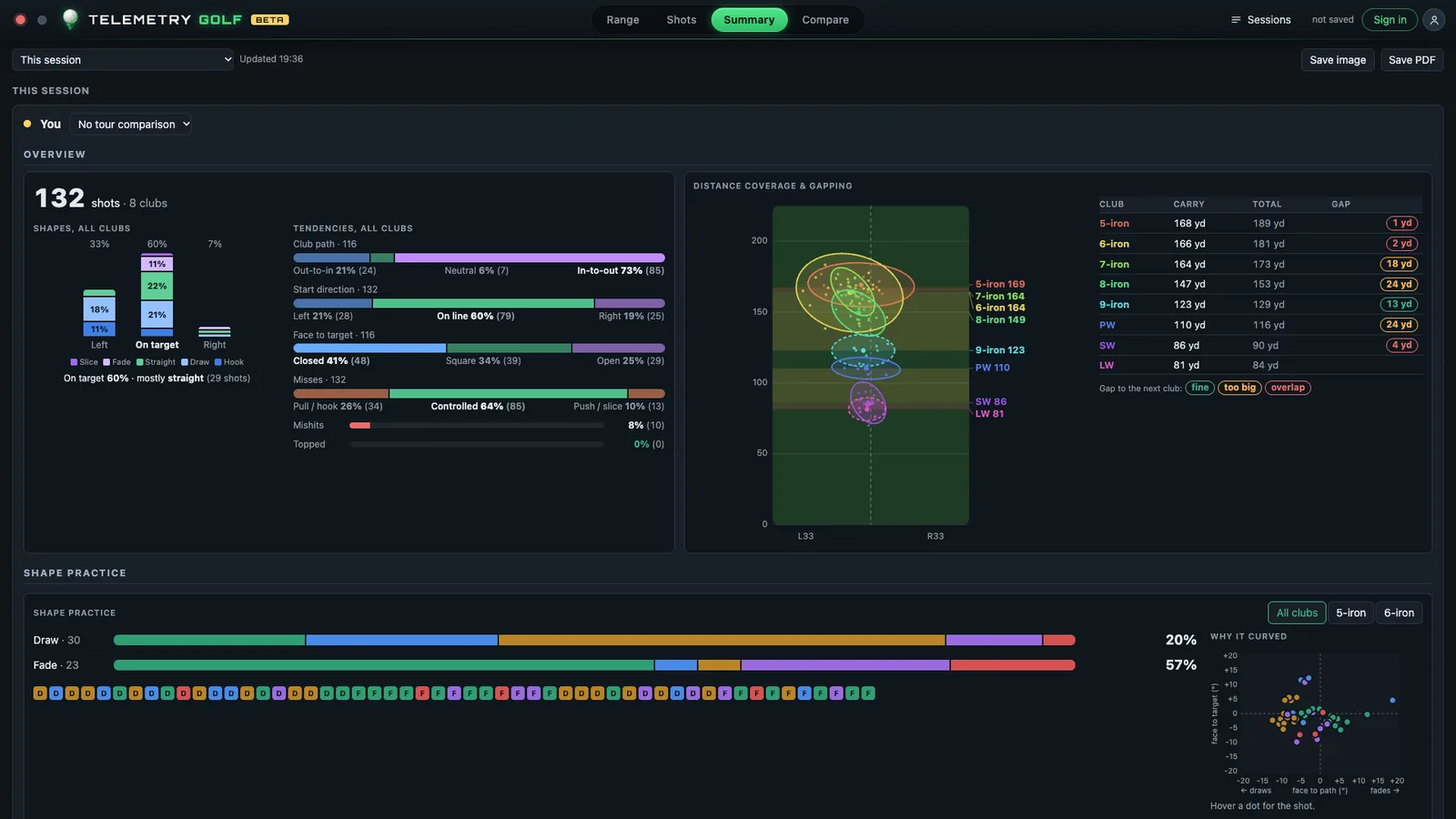
Summary: distance coverage and gapping chart with each club's landing ellipse and a table of carry, total and gaps
Summary → distance coverage and gapping: every club's landing ellipse, carry, total and the gap to the next club.
PLOT TWIST 02 · THE HOLE IN THE BAG

Nothing goes 150 yards

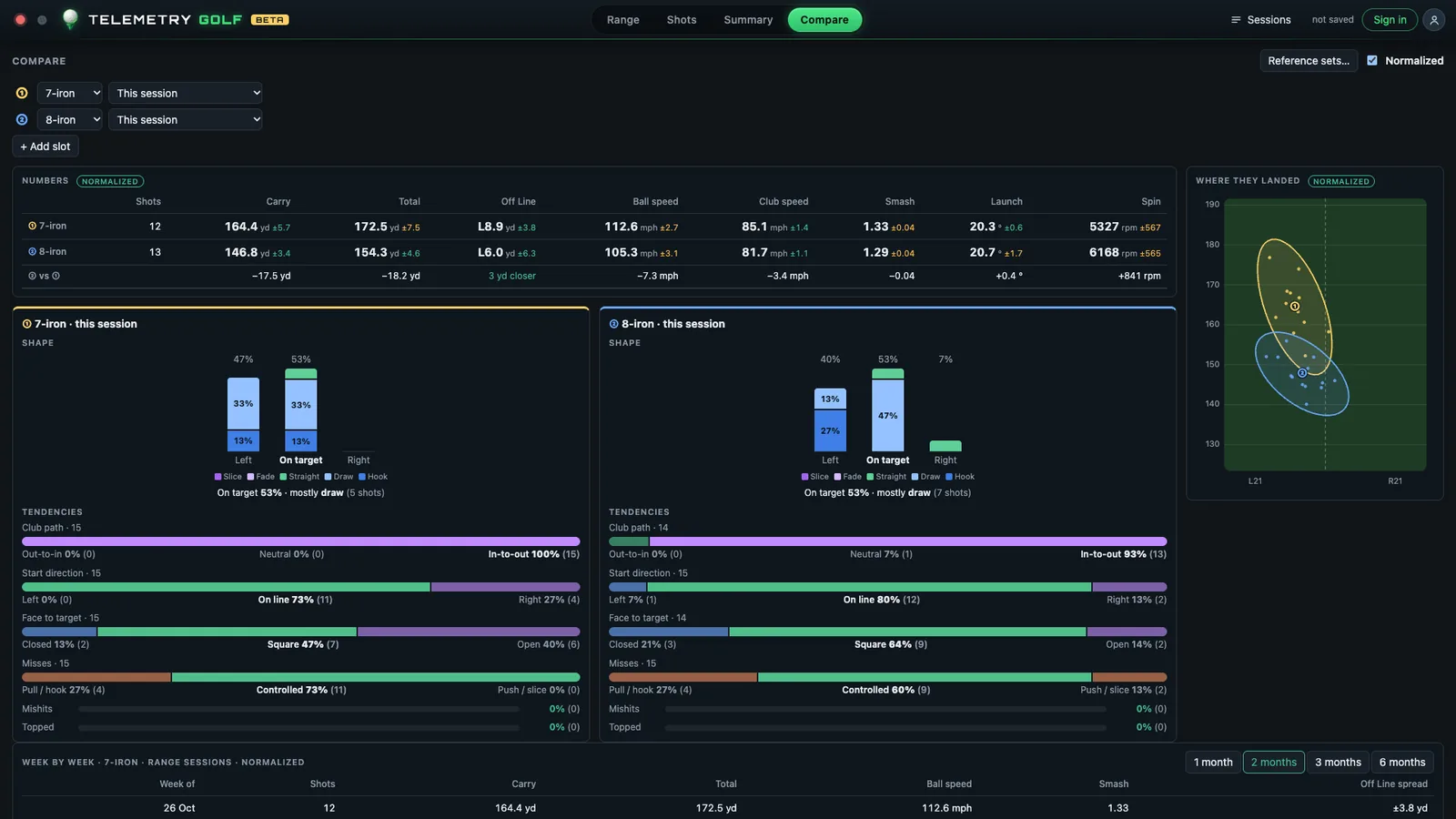
7-iron164 yd
Gap18 yd
8-iron147 yd

Meanwhile, one club further down, there's an 18-yard canyon. Every 150 to 160 yard shot this golfer faces is a guess between a smashed 8 and a choked-down 7. (It's usually the smashed 8. It usually doesn't work.)

Work on: a three-quarter 7-iron. Tag those shots "Drill" and the Summary splits them out, so you'll see when your stock 155 is real.

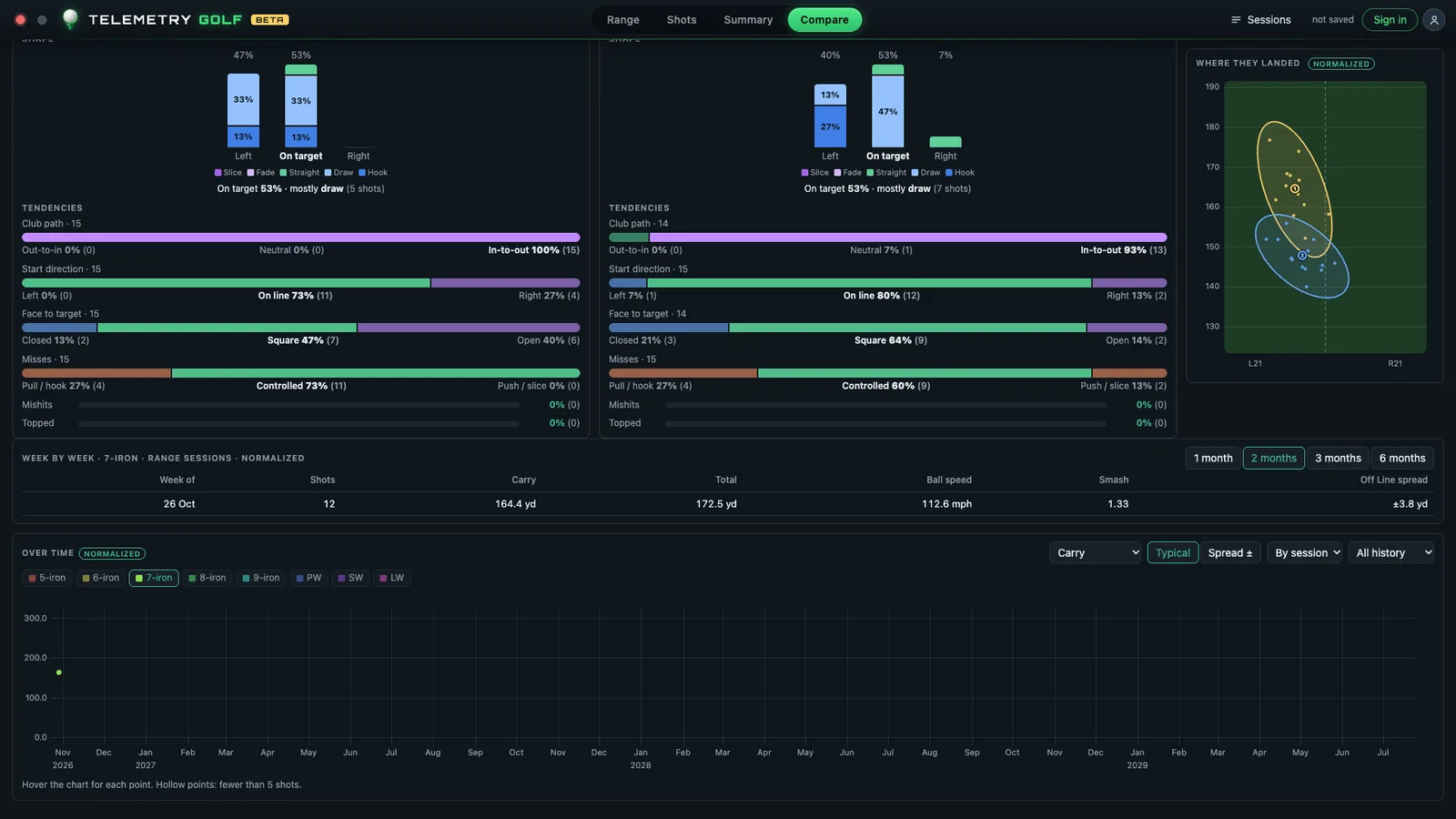
Compare: the 7-iron against the 8-iron, carry 164.4 against 146.8 yards, with their shapes, tendencies and landing ellipses
Compare: the 7-iron against the 8-iron, side by side. That −17.5 yd in the bottom row is the canyon.
PLOT TWIST 03 · CAUSE AND EFFECT

The draw you didn't order

Path in-to-out73%
Face closed41%
Pull / hook26%

The swing path is lovely: in-to-out on 73% of swings, which is textbook for a draw. The problem is the face. It's closed to the target 41% of the time, so instead of a gentle draw, one shot in four starts left and keeps going.

Work on: the face, not the path. Grip and release, not a swing rebuild. Most golfers would have "fixed" the wrong thing.

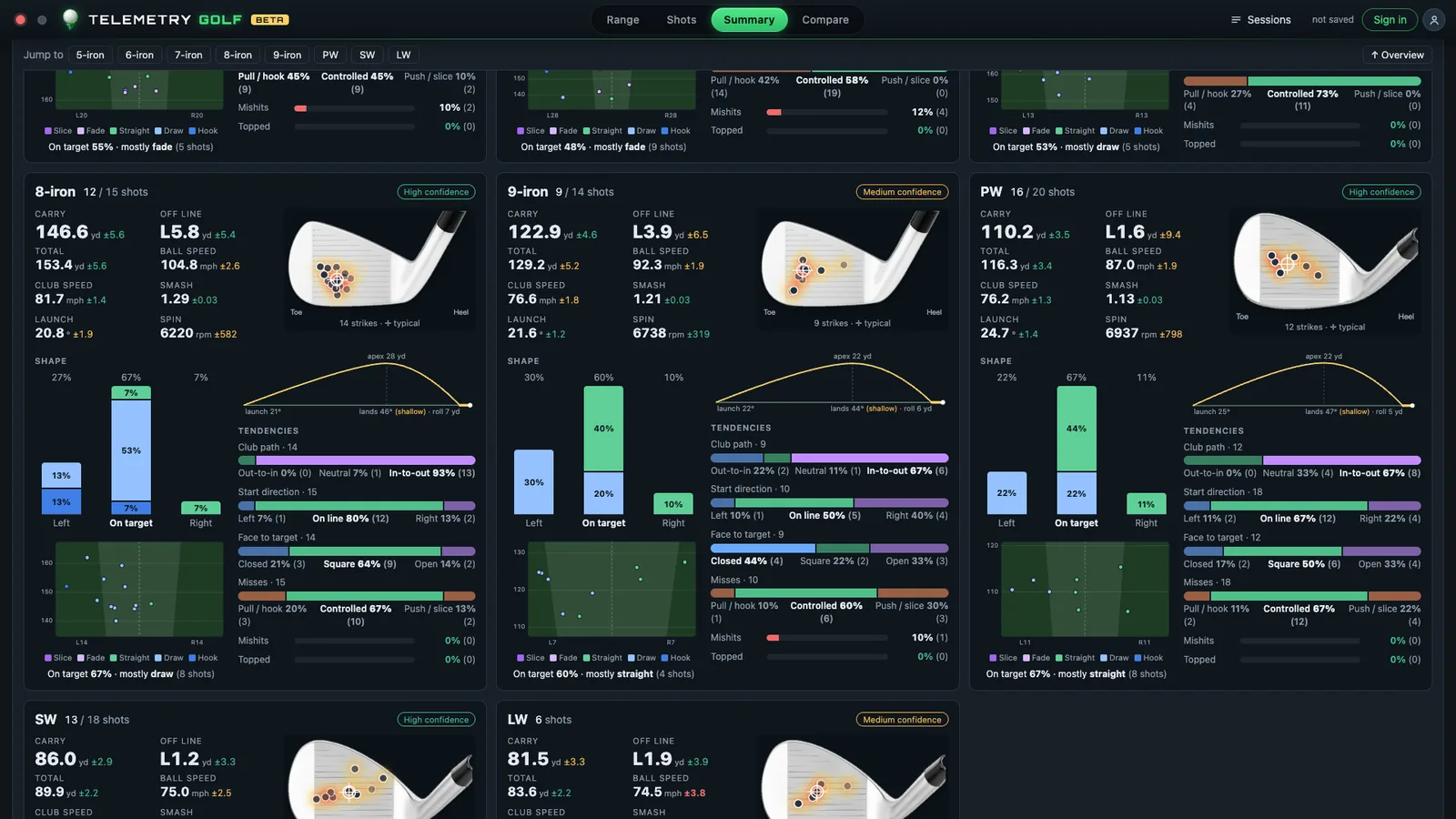
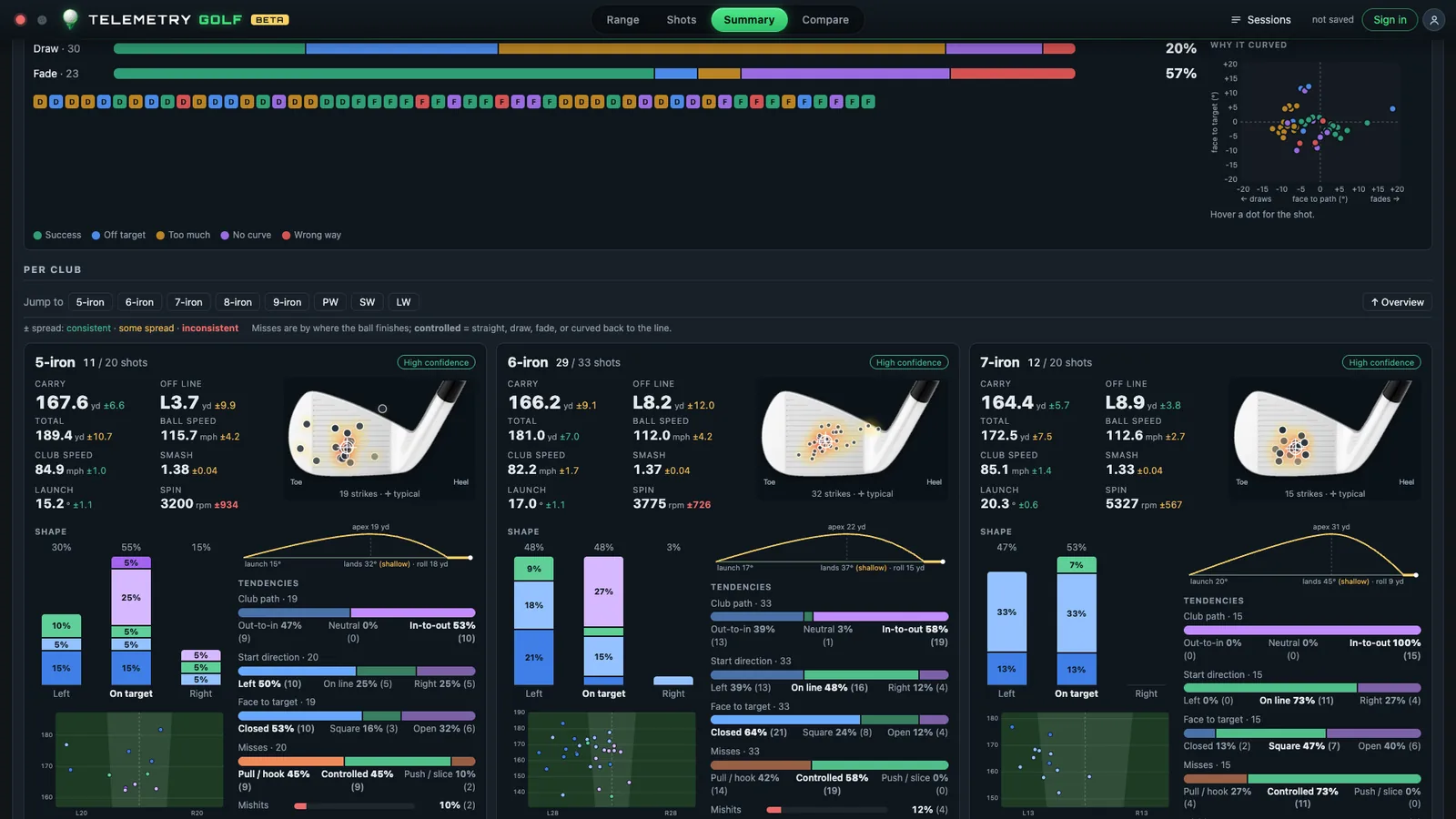
Summary club cards: per club carry, spread, strike map, shape bars, tendencies for path, start direction, face and misses
Summary → a card per club: averages, strike map, shot shapes and the tendencies behind them.
PLOT TWIST 04 · YOUR REAL NUMBER

Your 7-iron isn't 175

Carry164.4 ±5.7
Off lineL 8.9 yd
Smash1.33

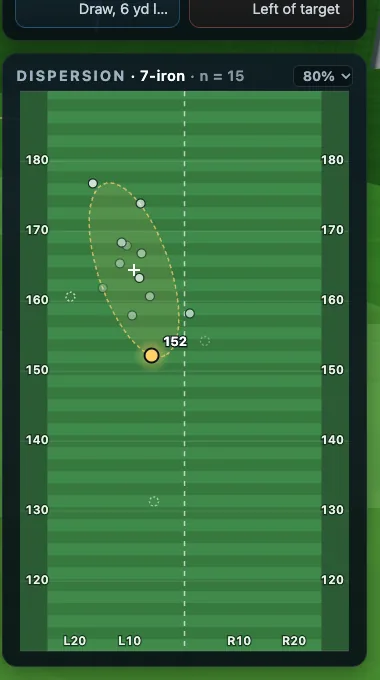
Everyone remembers their best 7-iron. The app remembers all of them, leaves out mishits and outliers fairly, and tells you how confident it is. This one is 164 yards give or take six, and it lives nine yards left of where you aimed.

Work on: nothing, for once. Just aim nine yards right and club off 164. Then go back to twist 03, which explains the nine yards.

Dispersion map: landing points of the 7-iron from above with the ellipse where most land
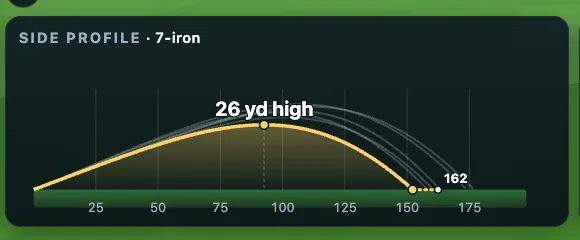
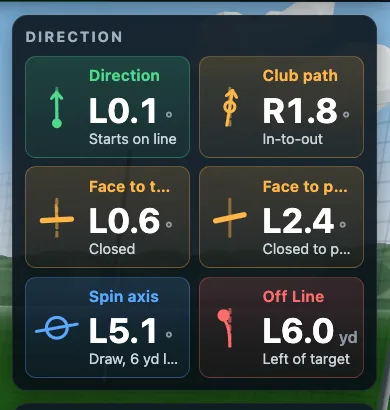
Side profile of the flight: apex 26 yards high, carry and roll Direction card: start direction, club path, face to target, face to path, spin axis and off line
The dispersion map (click a ball to leave it out of the ellipse), the side profile and the direction card.

The app

A tour, in screenshots

Everything below is the real app with the demo session loaded. Click any picture to see it full size.

The range: your shot, in 3D

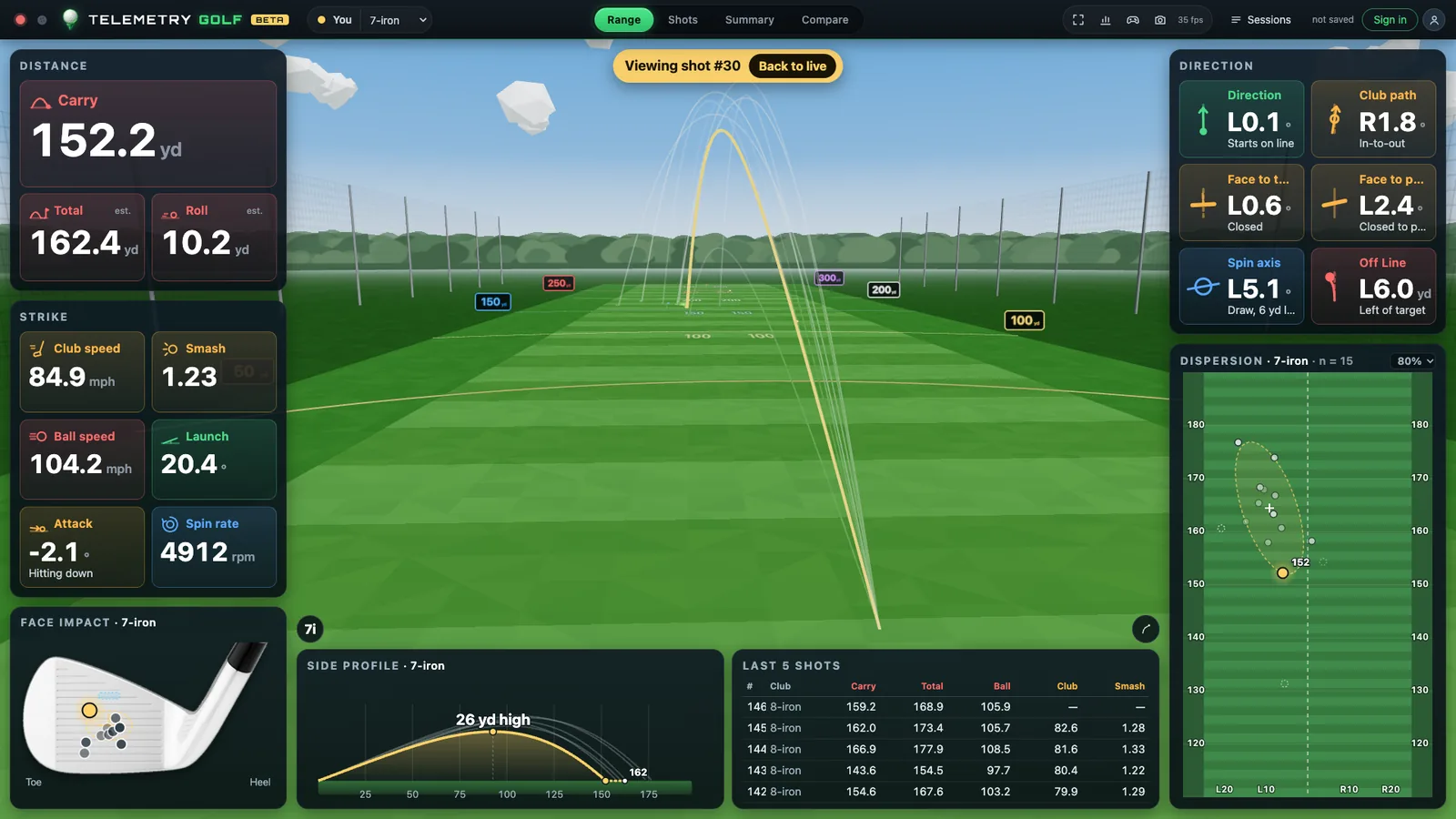
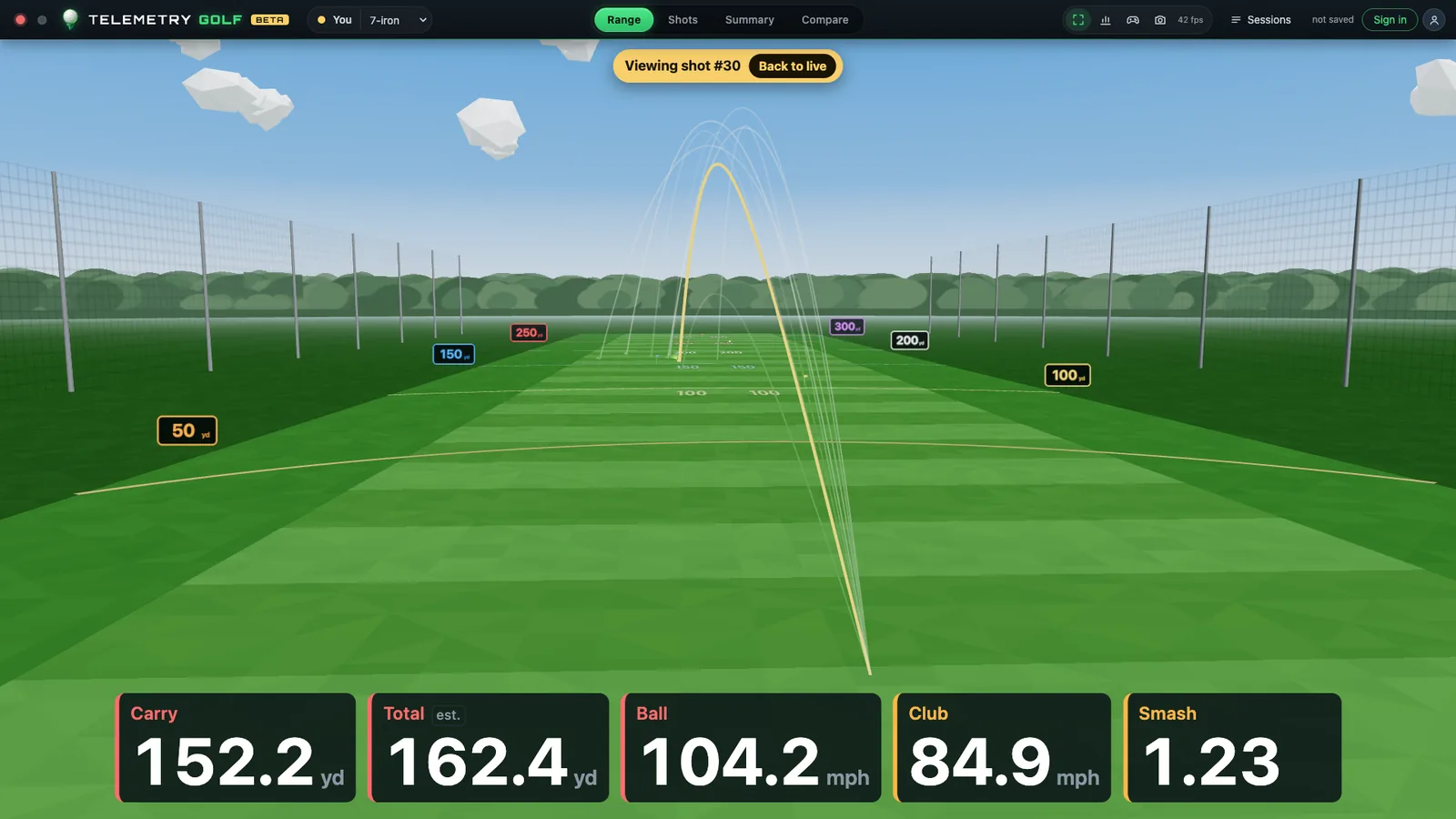
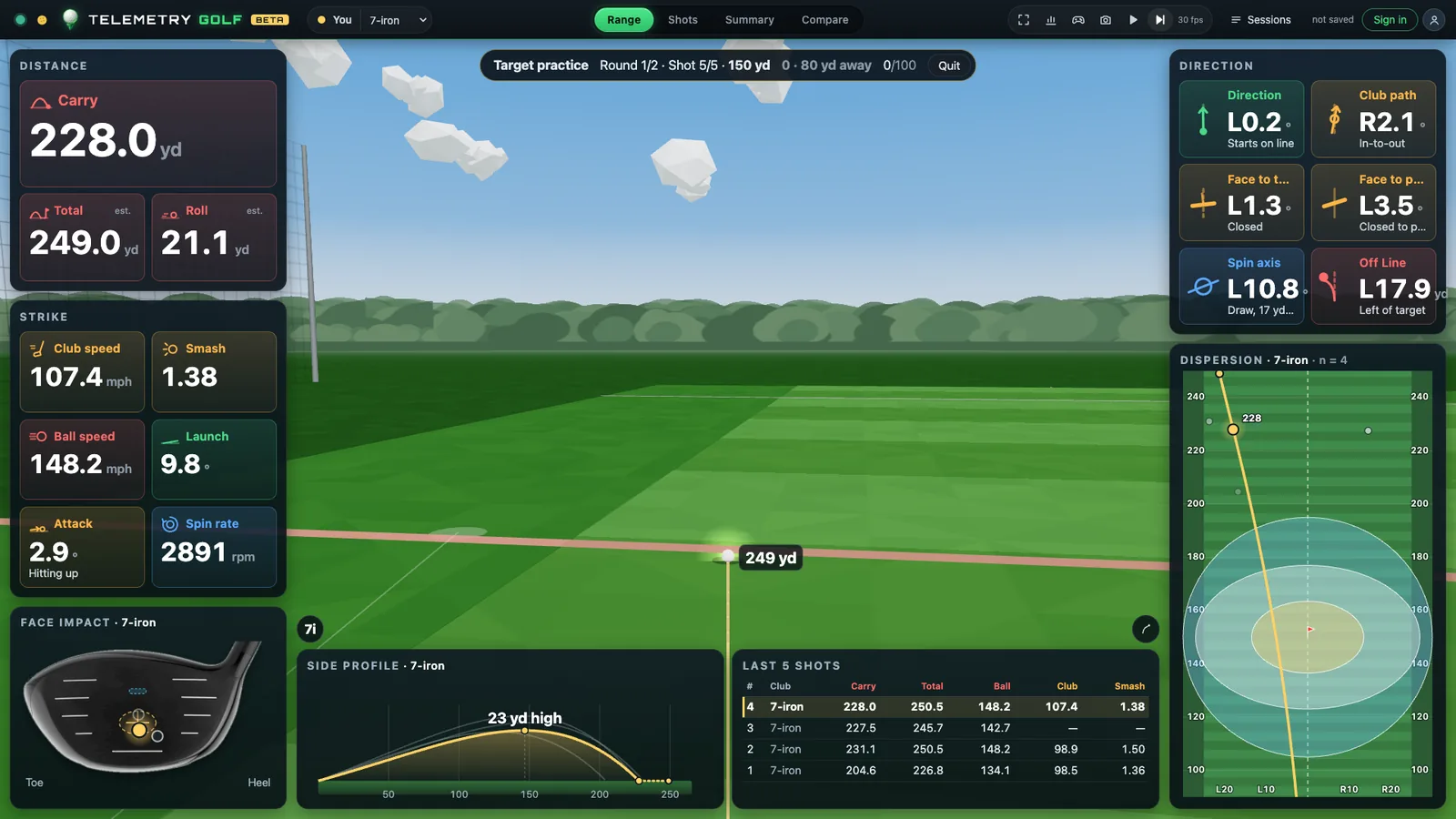
Each shot flies on a low-poly range with real physics: carry, bounce, roll, spin and altitude. The numbers count up as the ball flies.

  • Distance, strike and direction cards, each number colour-coded with its own icon
  • Face impact, side profile, dispersion and your last five shots around the edge
  • Cameras behind you, chasing the ball, from above or at the target (C)
  • Flags with real cups. A slow ball drops in. Rarely. Gloriously.
The range view: a 7-iron's flight with every number around it

Every number, labelled

Ball speed, launch, spin, spin axis, carry, total, roll, apex, descent, club speed, smash, attack, path, face to target, face to path, off line and more. Hover any one for what it means.

  • Carry, total and roll from our own flight and ground model, not just the device's
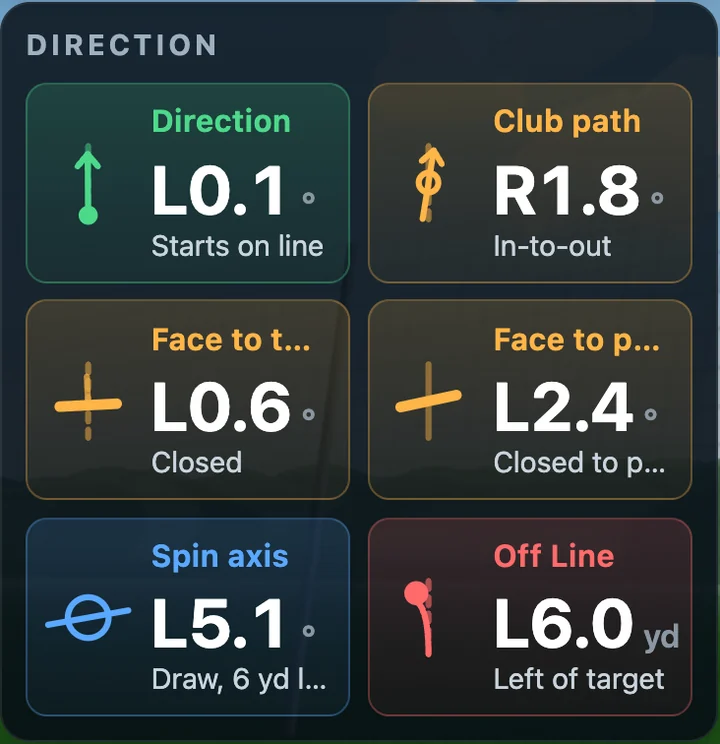
  • Plain words beside the numbers: "Draw, 6 yd left", "Hitting down", "In-to-out"
  • Altitude presets by golf course, with the expected carry change
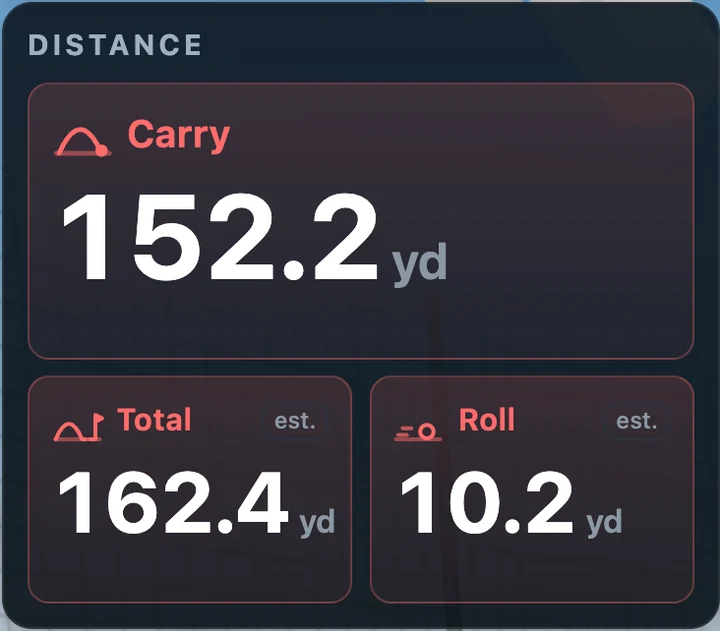
Distance card: carry 152.2 yd, total 162.4 yd, roll 10.2 yd
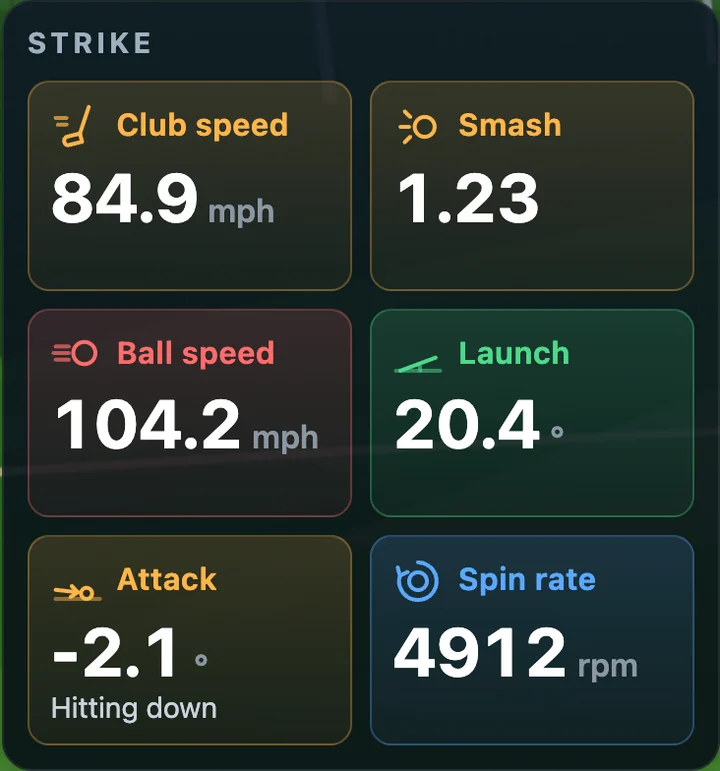
Strike card: club speed 84.9 mph, smash 1.23, ball speed 104.2 mph, launch 20.4°, attack −2.1° hitting down, spin 4912 rpm
Direction card: start direction, club path, face to target, face to path, spin axis and off line, each with a plain-words note
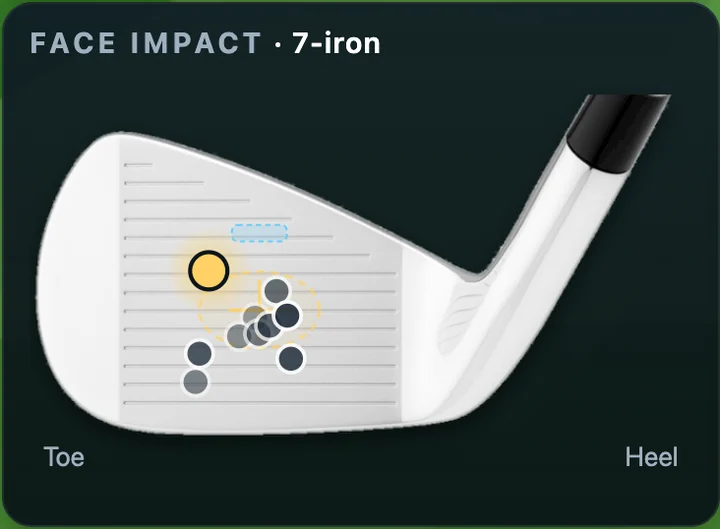
Face impact: where the last shots met the clubface

Focus mode, for the big screen

Projector in the bay? Press F. The panels slide away, the range fills the wall, and only the five numbers you pick stay along the bottom, big enough to read from the hitting mat.

Focus mode: full-screen range with carry, total, ball speed, club speed and smash along the bottom

The shots table

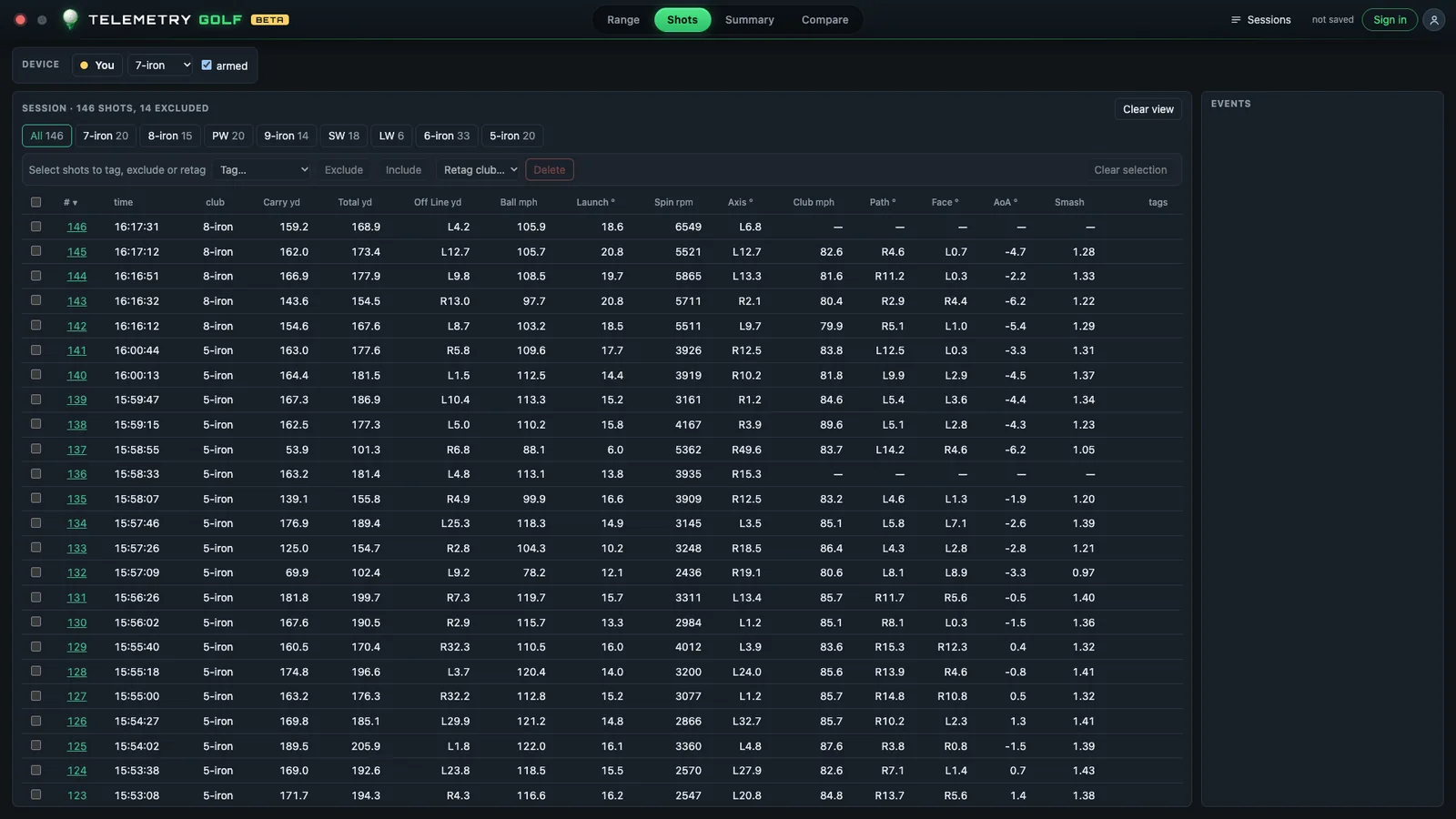
Every shot in one sortable table. Filter by club, tag shots (Mishit, Drill, Draw practice…), leave a duff out of the stats, retag a club you forgot to switch, export to CSV or JSON. Click a row to replay it on the range.

The shots table with club tabs and every metric per shot

Summary: the session as infographics

Shot shapes, tendencies, distance gapping, shape practice results and a card per club with averages, spread, strike map and tendencies. Save it as an image or PDF for your coach (or your group chat).

  • Confidence on every number, so 3 shots don't pretend to be 30
  • Outliers and mishits left out, fairly and visibly
Summary: shape practice results and per-club cards

Compare: are you actually getting better?

Club against club, this session against your last 30 days, you against tour averages, week by week, and any metric over time. Normalized mode takes weather and altitude out, so a mountain range session doesn't flatter you.

Compare: 7-iron against 8-iron, numbers side by side with landing ellipses Compare: week by week and a metric over time

Challenges

Practice, but make it a game

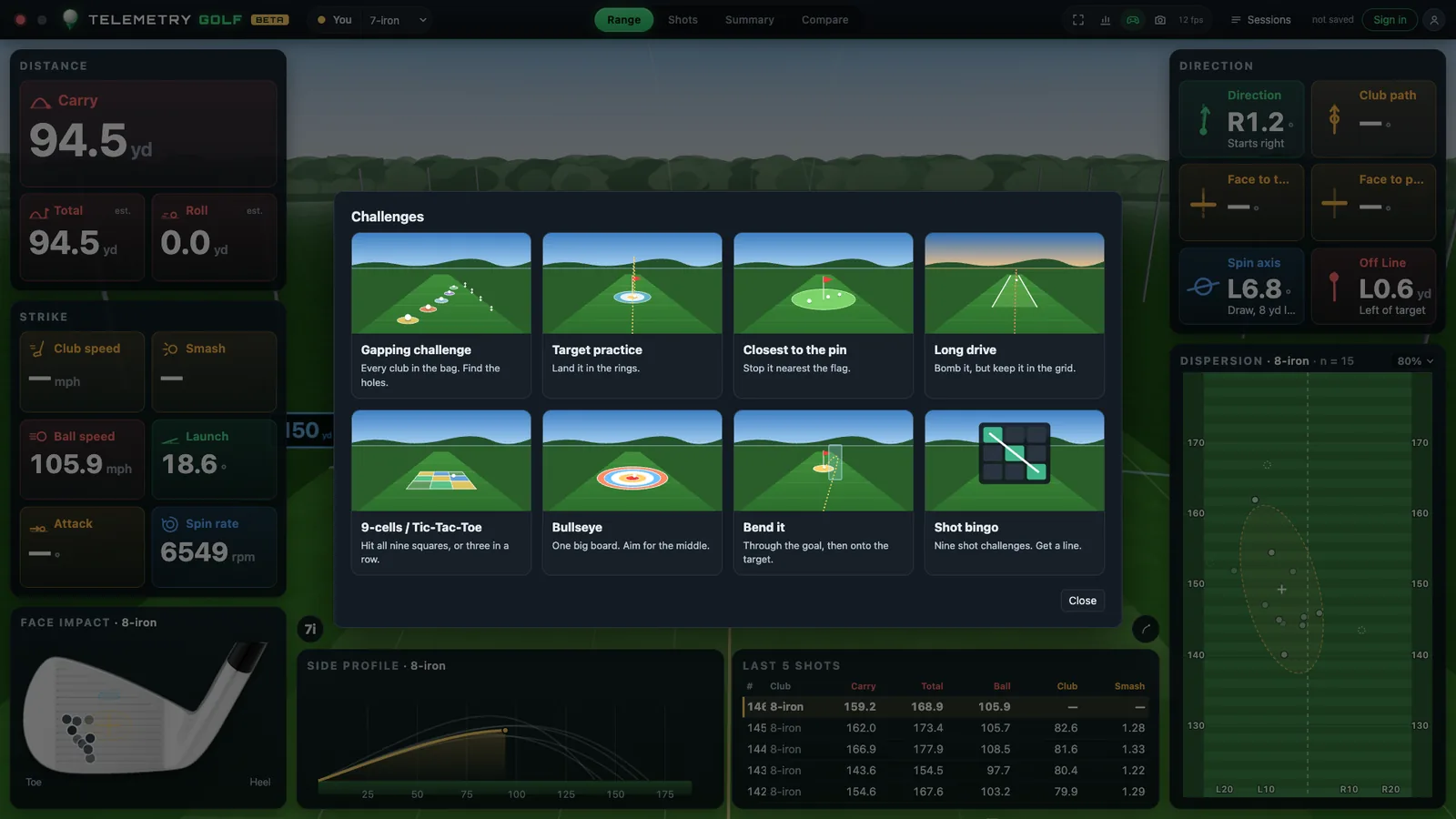
Eight challenges keep practice honest: target practice, closest to the pin, 9-cells (tic-tac-toe), bullseye, bend it, shot bingo, long drive and a full-bag gapping challenge. Solo or against friends taking turns, with the winner read out at the end.

Target practice in progress: rings on the range, the score bar and the shot's numbers
Target practice: rings on the range and on the minimap, scored where the ball lands.
The challenges menu
Pick a game. Each one starts its own session, so your range stats stay clean.

What you need

A launch monitor and Chrome

Telemetry Golf runs in the browser and talks to your launch monitor over Bluetooth: nothing to install. Chrome or Edge on Windows, macOS, ChromeOS or Android.

Square Golf Omni Supported

Ball and club data, ball-ready light, the full set of numbers.

Garmin Approach R10 Beta

Connects over Bluetooth; we're finishing it with real bay sessions.

More on the way Planned

The original Square Golf, and Wi-Fi launch monitors through a small bridge.

Never used it before? Take the tour.

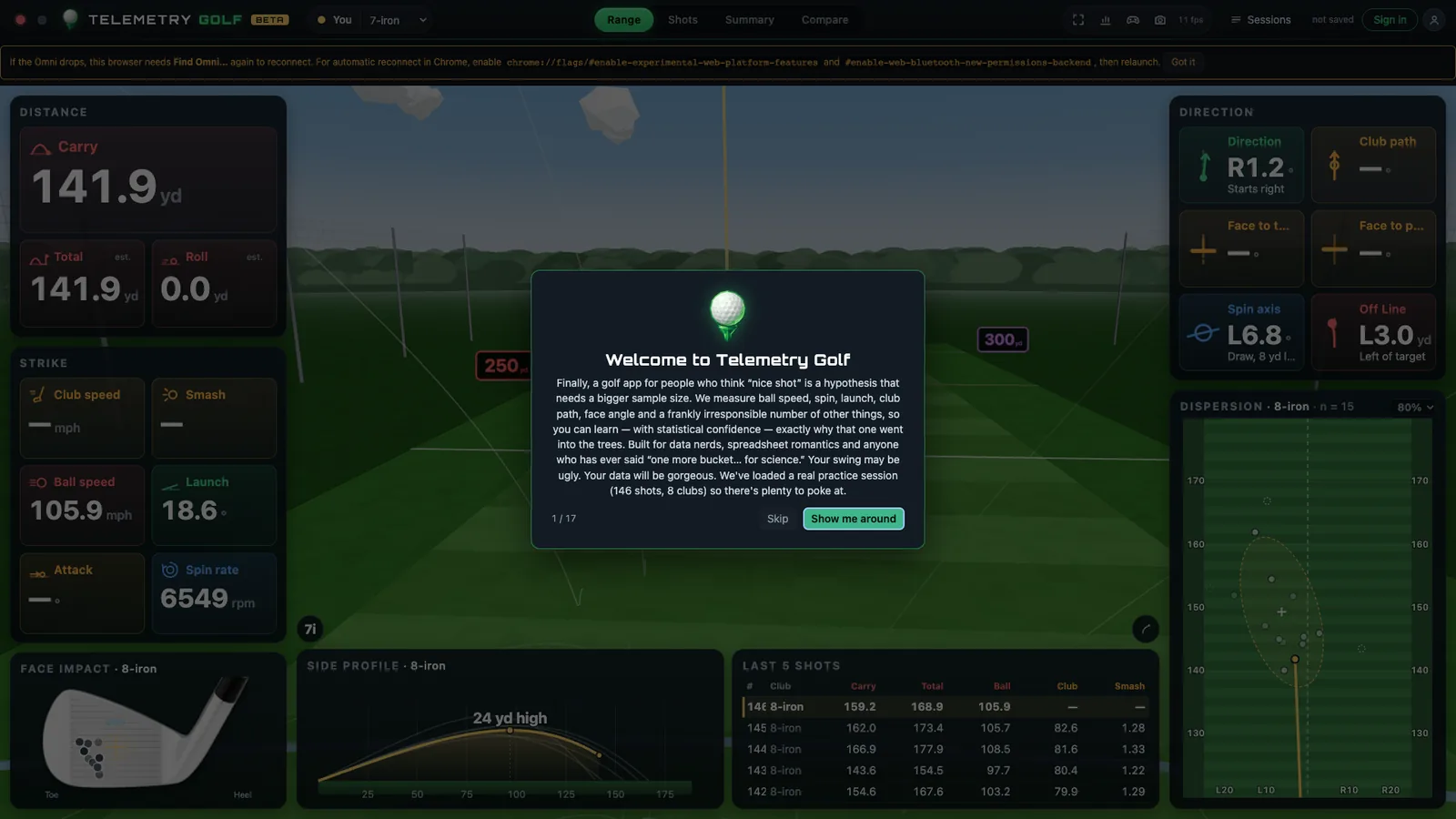
Your first visit loads the demo session and walks you through every part of the app in under two minutes, with tooltips and a joke or two. It's in the menu any time.

The welcome card of the tour over the range

FAQ

Questions

Do I need a launch monitor to try it?

No. Your first visit loads a real 146-shot practice session, so every page (range, shots, summary, compare) has something to show.

Which browsers work?

Chrome or Edge on Windows, macOS, ChromeOS and Android. Safari and Firefox don't support Web Bluetooth yet, so they can show the demo but can't connect to a launch monitor.

Do I need an account?

Not to use it. Without one, nothing is saved once you close the page. Sign in with your email and your sessions are kept.

Whose data is it?

Yours. Export everything as CSV or JSON from Manage Data, or delete your account and all its data in one step.

How accurate are carry and roll?

Ball and club data come from your launch monitor. Carry comes from our flight model, checked against published launch-monitor data; roll depends on the ground, so it's marked as an estimate.

Is this a beta?

Yes. Things change quickly and occasionally break. Report a bug from the menu in the app, or email [email protected].

One more bucket. For science.

Open the app, poke at the demo session, and find out what your 7-iron has been hiding.

Made by a golfer and data nerd who wanted to know why one 7-iron kept going left. (It was the face.)

Plus keeps your whole history: shots older than 30 days stay, with analytics and Compare across all of it. It's in the app's menu when you want it.